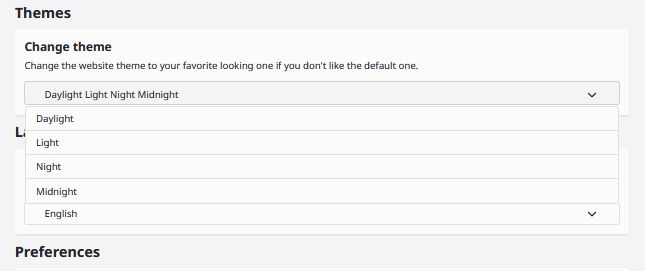
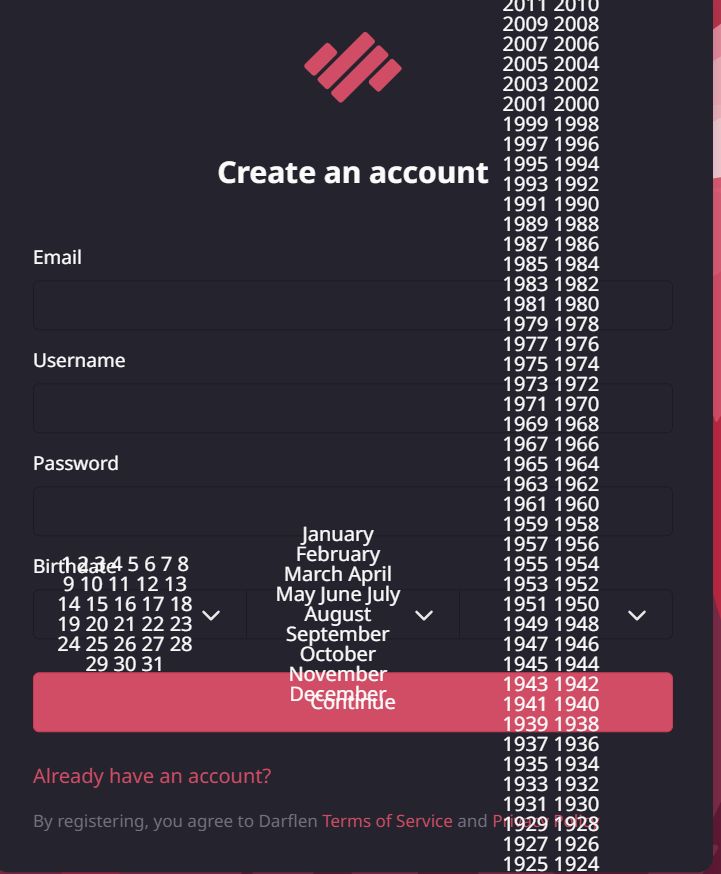
please can you fix this issue on computers thanks can't even fucking sign up

Comments
-
 ⓧ mikaH 6 months ago
That always happens to me a year ago -
-
-
-
google chrome and microsoft edge this happened for me on my laptop.
google chrome version: 143.0.7499.170 -
try to get logs from the console when you're trying to do use the dropdowns, this could help me further
still testing currently -
is this related to your dropdown bug
i wasn't sure because it shows the actual dropdown thingy and i haven't seen that in any of the examples of the dropdown bug
i was also messing around in developer tools so i'm unsure if that caused it -
-
well, this is the error i got: Uncaught TypeError: can't access property "focus", select_options_option[current_select_index] is undefined
onclick https://static.darflen.com/js/main.js:398
initialize_selector https://static.darflen.com/js/main.js:394
handle_dom_modification https://static.darflen.com/js/main.js:1272
handle_dom_modification https://static.darflen.com/js/main.js:1271
observer https://static.darflen.com/js/main.js:1319
observer https://static.darflen.com/js/main.js:1309
observe_dom_changes https://static.darflen.com/js/main.js:1308
<anonymous> https://static.darflen.com/js/main.js:1330
this was on firefox v146.0
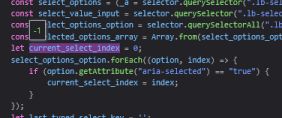
alsocurrent_select_indexwas set to -1, causing this error (shown in the image)
i BELIEVE the -1 was caused by which was used on line 421
in my case though, this was only caused by setting the value (i don't know if in the other cases it was due to setting it or not) -
-
this error can help me, thanks
the thing is is how do you make this happen as a regular user... -
i replicated it kinda..
except it makes no sense because you have to click on a small area to cause it in my case
plus there is no error so i dunno. doesn't make sense to me
maybe update 408 to this:
if (selected_value !== null && Array.from(select_options_option).includes(selected.target)) {
apart from it listing every item, does it have any other effects? like does it prevent the user from using the dropdown -
-
it throws an error on chrome-based browsers but you can retry another option and it will solve by itself
(it doesn't prevent you from re-using it) -
ok I did a hotfix and it solves your problem
but does it solves dert problem? idk he should try again and clear his cache -
i think maybe dert was using the actual scroll bar as i show in the video?
i used the old version of main.js and it caused this when i attempted to use the scrollbar
assuming they were doing that, it doesn't cause the issue anymore. -